

Roblox’s TextChatService conversation moved from roadmap posts to a live creator Q&A on November 3, 2026. The webinar was scheduled for 10–11 a.m. Pacific Time, and Roblox’s event listing now marks it as finished. For players, however, the most important point is easy to miss: this is not a sudden, universal redesign of every game’s chat window. Roblox is moving custom in-experience chat toward a platform-integrated system that handles message delivery, rendering, filtering and safety controls more consistently. The practical impact depends on whether a game uses ordinary Roblox chat or a heavily customized chat interface.
This follow-up separates what Roblox has publicly confirmed from what remains unverified. The public event listing confirms that the Q&A took place, but the accessible listing does not provide a transcript or replay. That means there is no reliable basis for attributing new promises or answers to the webinar. The confirmed roadmap, documentation and developer guidance still give players and creators a clear picture of what changes now, what is coming next, and why the May 2027 milestone matters.
What happened at the November 3 TextChatService webinar?
Roblox announced the live Q&A in an October 28 update to its developer announcement, inviting creators to bring questions about the TextChatService changes. The official Creator Events listing identifies the session as “Live Q/A on TextChatService Updates,” scheduled for November 3 from 6–7 p.m. GMT, equivalent to 10–11 a.m. Pacific Time. The listing now says the event has finished.
That confirms the event date and subject, not the details of every answer. As of November 4, the public event page available for this report does not expose a full transcript or replay. Readers should therefore be careful with posts claiming that Roblox changed a deadline, restored a removed API, or promised a specific feature during the webinar unless they can point to a recording or an official written follow-up. The safest reference remains Roblox’s developer announcement and the current Creator Hub documentation.
The webinar matters because developers raised questions about custom chat layouts, role prefixes, moderation, message history, announcements, multiple channels and performance. Those are not cosmetic details for games built around guilds, teams, roleplay, trading or live events. A chat system can be part of a game’s core interface, and replacing it affects how players coordinate, identify one another and receive moderation.
See the official Roblox Creator Events listing and read Roblox’s TextChatService announcement.
What the native chat rollout actually changes
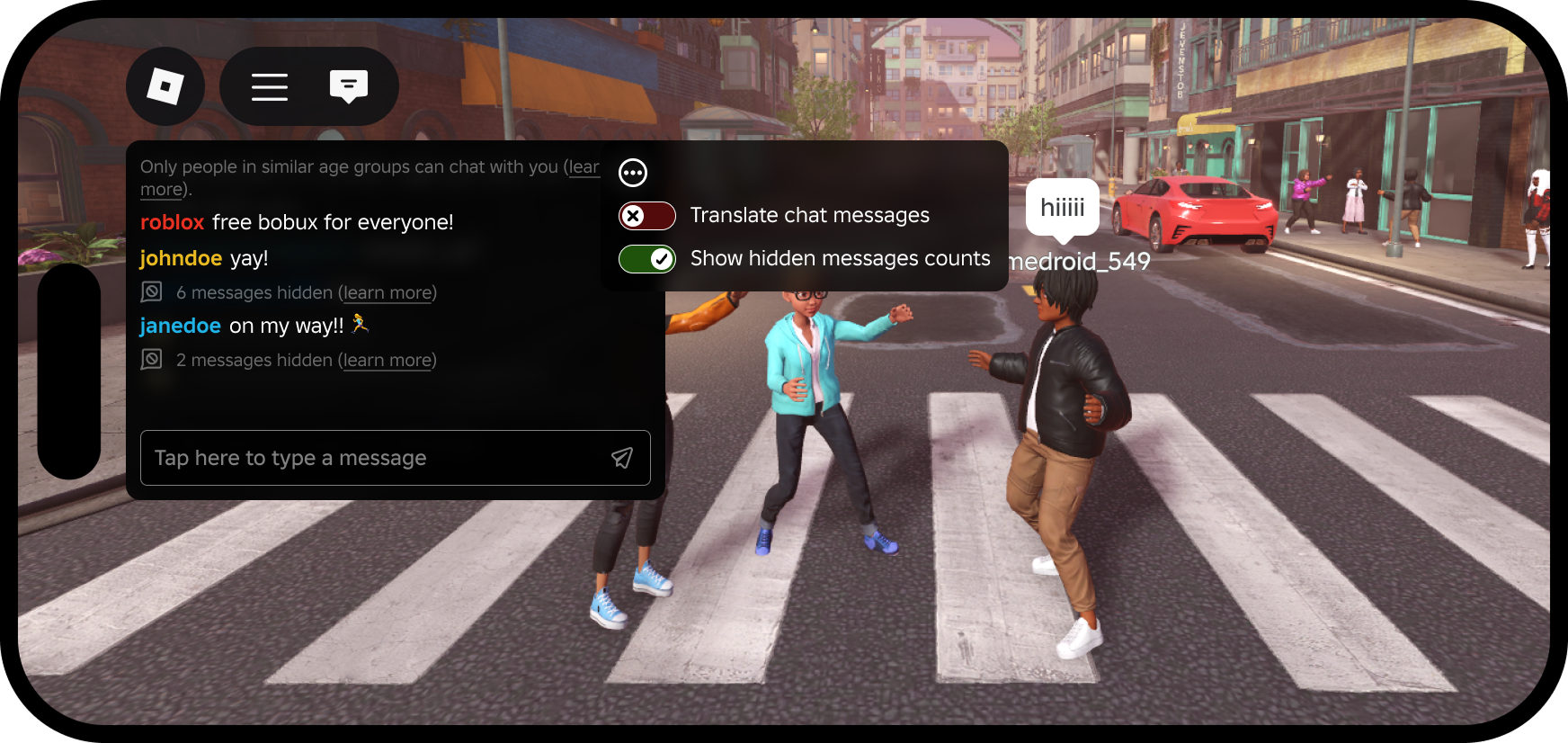
The update is built around platform-integrated chat and Roblox’s native TextChatService components. Developers can use a TextChannelWindow to place a chat window within their own interface and target a particular TextChannel. Roblox then manages message delivery and rendering rather than allowing a game’s custom interface to display raw player message text itself.
That distinction is important. A game can still choose where its chat window appears and adjust supported visual properties, but developers cannot keep every old custom-chat behavior simply by copying their previous interface. Once platform-integrated chat is enabled, player message content is no longer available to game code. Roblox’s documentation says APIs that previously returned message text return an empty string instead, and custom interfaces must use the native window rather than independently rendering player messages.

For players, the goal is more consistent access to built-in safety features such as reporting and muting. For creators, the trade-off is that some custom systems must be rebuilt around Roblox-supported components. The change is not simply “Roblox removed chat”; it is a change in who controls message rendering and which APIs a game can use.
Will ordinary Roblox players notice a difference right away?
Not necessarily. Roblox’s current documentation says nothing changes in a game until its creator enables TextChatService.PlatformIntegratedChat. It also says games that use the default Roblox chat without customizations do not need to take action and should not see a change from this migration alone. That is why two players can hear about the same rollout but have very different experiences: one game may use the standard chat window, while another may rely on a custom-built chat panel, custom commands or role labels.
Players in a game that has not opted in should not assume that a missing feature means their account is broken. Players in a game that has opted in may see a more native-looking chat window, different handling of custom chat features, or changes as Roblox adds capabilities to the new window. The experience can vary by game because creators decide how to implement supported chat components.
There is also an important boundary: the update is about TextChatService. Roblox’s documentation says it does not change the existing policy for signs, boards, notes and other player-written in-world text surfaces. Those surfaces still cannot be used as a substitute for two-way player chat and must follow the applicable moderation and rate-limit rules.
What creators need to prepare before May 2027
Roblox’s October announcement sets out a phased transition. Creators can test platform-integrated chat now and provide feedback. Roblox said new and existing games would be opted in automatically in February 2027, with an option to opt out, and that the updated TextChatService would become the required route for custom chat in May 2027. The Creator Hub documentation likewise identifies May 2027 as the point when platform-integrated chat becomes required for all games.
Developers using custom chat should audit every place where players can communicate. Roblox specifically calls out custom chat UIs, chat-triggered commands, moderation tools, presets or chat wheels, and prefixes. Any system that lets players hold a real-time conversation outside TextChatService also needs attention. Creator-written signs and boards are a different category, but they must not become backdoor chat systems.

A practical migration checklist is straightforward: enable the platform-integrated setting in a test place first; check that every intended channel appears in the correct window; replace custom message rendering with TextChannelWindow; move chat-triggered actions to TextChatCommand; review moderation permissions; and test the experience with real players across the devices it supports. Do not switch a live production game before checking the features that make its chat distinctive.
For step-by-step setup, use the official Platform-integrated chat guide. The earlier Roblox TextChatService migration deadline explainer in this blog covers the broader transition and is a useful companion read.
Which features are changing, and what is still on the roadmap?
Roblox’s published roadmap describes a gradual move toward feature parity between the default chat window and the newer TextChannelWindow. The announcement lists one-click emojis for the default window in November, with support planned for the newer window later. Voice typing is already available in the default window and was listed as coming to the TextChannelWindow input bar. Translations and AI rephrases are also already available in the default window, with support for the newer window listed for November.
Other capabilities have later target windows. Roblox listed avatars and bubbles for the newer chat window as later-year work, a native prefix or role-badge solution for early 2027, and additional features such as quick-action menus and typing indicators during 2027. These are roadmap targets, not proof that every feature has shipped to every player. Availability can change as Roblox posts monthly updates.

One detail deserves special attention: Roblox has said display names will remain visible so players can identify one another and report problems. It has also described future role badges as filtered, approved labels rather than unrestricted custom prefixes. That approach is intended to preserve useful identity cues without allowing arbitrary text to bypass safety systems.
Watch Roblox’s official TextChatService demonstrations
Roblox linked creator-facing video demonstrations in its developer discussion so developers could see the intended customization direction. These videos are useful visual context, but they should be read alongside the written roadmap because a demonstration does not establish that every feature is already generally available.
Creators should compare the demonstrations with the latest Text chat overview and chat window customization documentation. Those pages explain the supported components and the difference between a default chat window and a custom-positioned native window.
What players should do now
Most players do not need to change a Roblox setting just because the webinar happened. If chat behaves differently inside a particular experience, check that game’s update notes and allow its creator time to test the new system. Keep using Roblox’s report, mute and block tools when needed, and avoid sharing personal information in chat. If a feature disappears, report the issue to the game creator with the experience name, device and a short description rather than assuming the entire Roblox chat system is down.
Creators should use the current testing period to identify unsupported code and test their migration before the 2027 milestones. The safest approach is to treat the webinar as a chance for questions and clarification, not as a substitute for the published technical requirements. Until Roblox publishes a replay, transcript or a new written answer, claims about specific webinar promises should remain unconfirmed.
Frequently Asked Questions
Conclusion
The November 3 TextChatService webinar marks an important moment in Roblox’s transition toward native, platform-integrated chat, but the event itself should not be confused with a universal player-facing launch. As of November 4, the public event listing confirms the Q&A is over, while the official technical guidance still points to a phased migration and a May 2027 requirement. Most players using standard chat may notice little immediately. Developers with custom interfaces, commands, role labels or moderation workflows have more work to do. The clearest next step is to test in a separate place, follow Roblox’s monthly updates and rely on official documentation rather than unverified summaries of the webinar.
Sources: Roblox Creator Events — Live Q/A on TextChatService Updates; Roblox Developer Forum — Important TextChatService Updates; Roblox Creator Hub — Platform-integrated chat; Roblox Creator Hub — Text chat overview.





