

Roblox is bringing makeup creation directly into supported experiences. Announced on October 15, 2026, In-Experience Creation for Makeup lets players design custom eye makeup, lip makeup, face makeup, eyelashes, and eyebrows without leaving the game. Players can preview a look on their own avatar, submit eligible creations through Roblox’s creation flow, and save approved assets to their inventory.
Quick answer: You can create makeup inside Roblox only in an experience whose developer has implemented the new tools. The feature currently supports R15 avatars with MeshPart heads. Creations must pass Roblox validation and moderation. In-experience makeup is for personal use and cannot currently be traded, resold, or listed on the Marketplace by the player.
This is more than a new avatar menu. It gives developers a way to build makeup studios, face-paint games, and customization experiences around the avatar a player is actually using. But it is not a universal editor that suddenly appears in every Roblox game.
What is Roblox In-Experience Creation for Makeup?
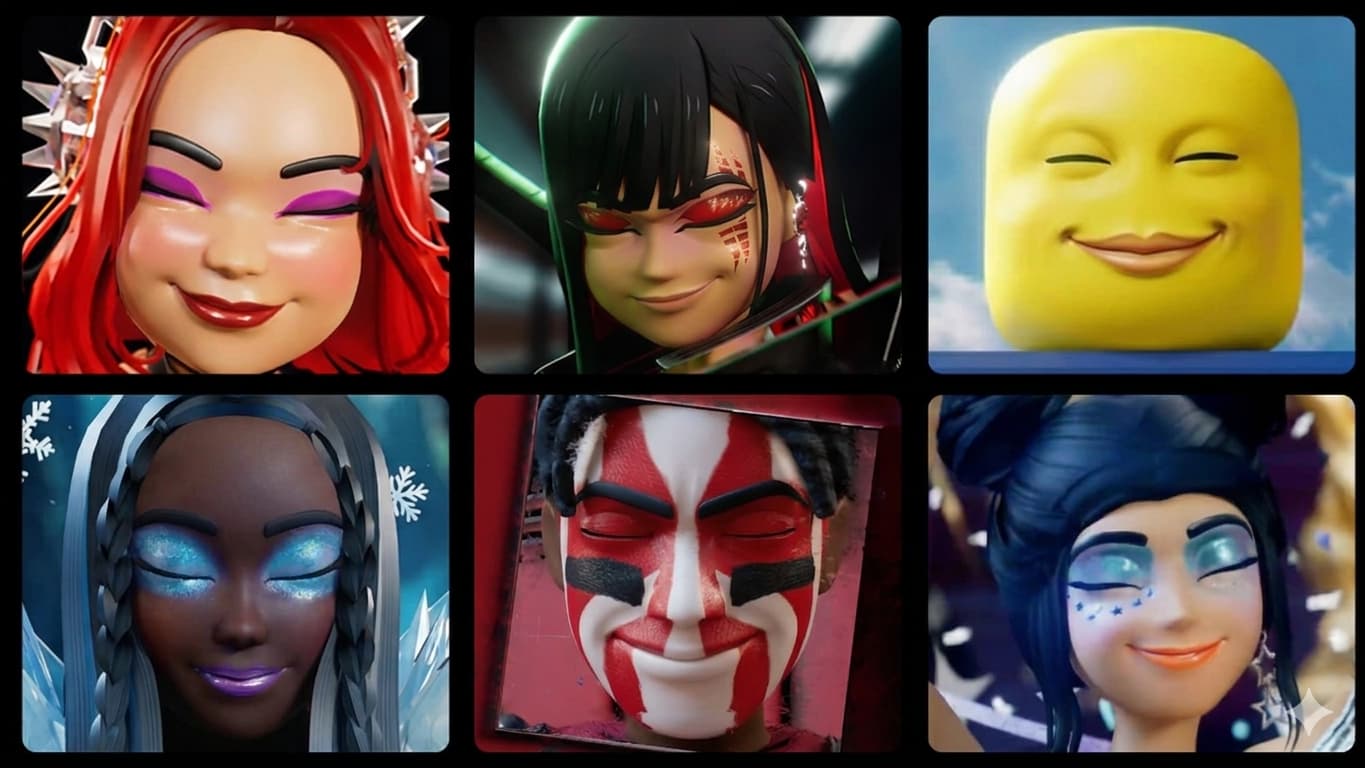
The October 15 release gives experience developers tools to let players author makeup assets at runtime. Supported types include face makeup, eye makeup, lip makeup, eyebrow accessories, and eyelash accessories. Painted makeup uses texture-based assets, while eyebrows and eyelashes can be created as layered mesh accessories.
The key difference from choosing an existing Marketplace item is the creation process. A supported game can let a player paint or assemble a look on their own avatar head and see the fit in real time. That immediate preview addresses a familiar frustration with avatar cosmetics: a design that looks good on one preview head may not sit the same way on another head shape.
Can you create makeup in any Roblox game?
No. A game must deliberately implement Roblox’s in-experience creation APIs and provide its own user interface. The October announcement points players to the uncopylocked Roblox Avatar Creator demo as a place to try the workflow. If a game has no makeup station, editor, or creation prompt, players cannot switch the feature on themselves.
That distinction matters when searching for “Roblox makeup creator” or “make makeup in Roblox.” The feature is available to developers, but player access depends on the individual experience. A game can build a full makeup studio, offer selected creation options, or choose not to implement makeup creation.
How to try the Roblox makeup creation feature
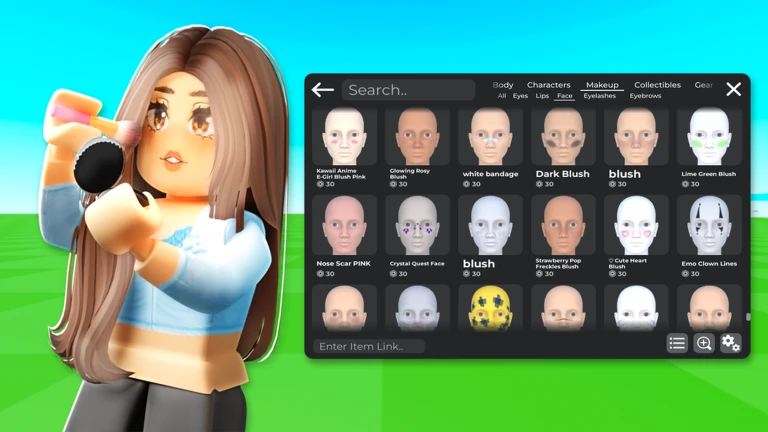
- Open the Roblox Avatar Creator demo or another experience that clearly offers in-experience makeup creation.
- Look for its makeup studio, avatar customization area, or creation station. The interface varies because developers build their own experience around Roblox’s APIs.
- Choose an offered makeup type: eye, lip, or face makeup, or a layered eyebrow or eyelash accessory.
- Use the available brushes, colors, and layers. Roblox’s launch example highlights soft brushes for blush and eyeshadow, glitter brushes, and metallic effects.
- Preview the design on your current avatar head and adjust it before submitting.
- Review the purchase and creation confirmation, including the displayed cost, before proceeding.
- Wait for validation and moderation. Submission does not mean automatic approval.
- After successful creation and moderation, check your Roblox inventory for the saved asset.
There is no universal button sequence for every game. Each developer controls the interface and may offer different brushes, templates, and creation options.
Which makeup types can players create?
| Asset type | Typical use |
|---|---|
| Face makeup | Decorative face designs, blush, face paint, and facial effects. |
| Eye makeup | Eyeshadow, liner, and designs around the eyes. |
| Lip makeup | Lip color and custom lip treatments. |
| Eyebrow accessory | Layered mesh eyebrow designs. |
| Eyelash accessory | Layered mesh eyelash designs. |
Roblox’s documentation separates painted textures from layered mesh accessories. Players may see one makeup studio, but the game must prepare the correct asset type behind the scenes.
Can you save, trade, or sell makeup made inside a game?
Eligible creations can be saved directly to the player’s Roblox inventory after the creation flow succeeds. Roblox says these items are intended for personal use. They are not listed on the Marketplace and cannot currently be traded or resold by the player.
This is different from publishing a conventional Marketplace item. Do not spend Robux assuming an in-experience creation can later be sold to another user or transferred in a trade. The current rules do not provide that resale path.
Roblox requires created assets to pass validation and moderation. The October announcement says a purchase is not refunded if a submission fails moderation for violating Roblox’s standards. Players who believe a decision was incorrect may appeal through Roblox’s available process.
What avatar types are supported?
Roblox’s current Creator Hub documentation specifies R15 characters with MeshPart heads for in-experience makeup creation. This is a compatibility requirement, not simply a preference in a game’s settings. Players using other avatar setups may not be able to use the workflow in the same way.
Roblox says finished looks can transfer across other R15 heads the player owns, but that does not guarantee every head or rig is supported. If a design does not appear as expected, check the avatar type and the experience’s instructions.
What developers need to build a makeup studio
The feature is aimed at creators familiar with Roblox Studio and scripting. Roblox’s implementation guide describes several systems working together:
- AvatarCreationService: Prompts a player to submit a single makeup asset or a combined makeup look.
- EditableImage: Creates and manipulates makeup textures at runtime.
- EditableMesh: Supports mesh manipulation for relevant accessory workflows.
- WrapDeformer and WrapTarget: Help layered accessories fit avatar bodies and heads.
- WrapTextureTransfer: Projects and transfers makeup textures to the avatar head.
For one asset, developers can use AvatarCreationService:PromptCreateAvatarAssetAsync(). For a combined look, Roblox documents AvatarCreationService:PromptCreateMakeupAsync(), which accepts between two and six asset entries. Each entry needs a matching creation token, asset type, instance, and layer order. The multi-layer prompt returns an overall result and per-asset results, allowing developers to identify partial success.
Developers need the appropriate avatar creation tokens for the asset types they support. Roblox’s launch announcement also lists a Roblox Plus or Roblox Premium subscription requirement for the experience owner. Check current Creator Dashboard requirements before budgeting or launching a paid creation experience.
How the 70% revenue share works
Roblox says the experience owner can receive a 70% revenue share on purchases after recouping the creation advance. The announcement breaks this into 30% for the player who created the makeup item and 40% for the creator of the experience hosting the tool.
The phrase “after recouping the creation advance” matters. The 70% figure should not be treated as an unconditional immediate payout on every purchase. Developers should review Roblox’s current token and monetization terms before estimating earnings.
Why the real-time preview matters
Makeup is closely tied to the shape and UV layout of an avatar head. A generic preview can hide alignment problems that become obvious on a player’s own avatar. By supporting projection onto the current head, the experience can show the player what a design looks like before confirmation.
For players, that can make experimentation less frustrating. For developers, it creates a new type of experience: part avatar editor, part creative tool, and part social destination. The result still depends on the brushes, templates, controls, and validation flow the developer builds.
Official Roblox announcement
Roblox announced In-Experience Creation for Makeup on October 15, 2026. Read the original announcement and implementation documentation for current requirements and API details.
Roblox Developer Forum: Makeup Now Available for In-Experience Creation
What players should check before spending Robux
- Confirm the game supports in-experience makeup creation.
- Check which makeup types and brushes it offers.
- Preview the design on the avatar you intend to use.
- Read the displayed price and confirmation details.
- Remember that creations are personal-use assets, not tradable or resellable items.
- Allow time for validation and moderation; submission does not guarantee approval.
Frequently asked questions
Is Roblox makeup creation available in every game?
No. Developers must implement the tools. Players can use the feature only in experiences that provide a makeup creation flow.
When did Roblox launch in-experience makeup creation?
Roblox announced In-Experience Creation for Makeup on October 15, 2026.
Can I create eyelashes and eyebrows in Roblox?
Yes. Supported asset types include EyelashAccessory and EyebrowAccessory, alongside face, eye, and lip makeup. Availability depends on the experience.
Can I use makeup I create in other Roblox games?
Eligible creations are saved to your inventory and can be used across supported R15 heads you own, subject to Roblox compatibility and moderation rules.
Can I trade or resell makeup created inside an experience?
No. Roblox’s current documentation says in-experience makeup creations are for personal use and cannot be traded or resold.
Do I need an R15 avatar?
Yes. Roblox’s current documentation specifies R15 characters with MeshPart heads for in-experience makeup creation.
Do makeup creations go through moderation?
Yes. Created assets must pass Roblox validation and moderation before they are safe to use in-experience.
How much do experience creators earn?
Roblox says the experience owner can receive a 70% revenue share after recouping the creation advance: 30% for the item creator and 40% for the game creator.
Related Roblox coverage
Official sources
- Roblox Developer Forum: Makeup Now Available for In-Experience Creation (October 15, 2026)
- Roblox Creator Hub: In-experience creation for makeup
- Roblox Creator Hub: AvatarCreationService
- Roblox Newsroom: Avatar Makeup Launches Today on Roblox Marketplace
Author: Shivam Das





