
By Shivam Das
Roblox Studio is making procedural mesh editing more flexible with native quad-face support for EditableMesh. The update introduces a more direct way to create four-sided faces, reducing the need to split every quad into two separately managed triangles. For creators building mesh editors, box-modeling tools, procedural objects, or Studio plugins, that can make topology easier to work with.
The key change is the EditableMesh:AddFace() method: pass three vertex IDs to create a triangle or four vertex IDs to create a quad. Roblox announced the capability as a Studio Beta on September 23, 2026. The current Creator Hub API reference also documents AddFace() and quad behavior. Roblox's announcement said the team would iterate on feedback before making the API changes available in published experiences, so creators should check the current Beta Features panel and release notes rather than assume every live experience can use quad creation already.

What changed with EditableMesh quad support?
Before this update, EditableMesh faces were triangles. A developer who wanted a four-sided surface had to create two triangles, choose a diagonal, and manage the pair so that it behaved like one logical face. That approach worked, but it added bookkeeping to tools that needed to move vertices, update topology, or preserve a clean modeling workflow.
Native quad support lets a script create that four-corner face as one face instead. Roblox says triangles and quads can coexist in the same EditableMesh. This is useful for procedural modeling and box-modeling workflows, where creators often think in four-sided polygons before the engine converts geometry for rendering.

How the new AddFace() method works
The method accepts either three or four vertex IDs, in order around the face, and returns a face ID. Three IDs create a triangle; four create a quad. Roblox's API reference documents the method as EditableMesh:AddFace(vertexIds:Tuple).
local faceId = editableMesh:AddFace(v1, v2, v3, v4)In this example, v1 through v4 must be vertex IDs that already exist in the EditableMesh. The returned faceId identifies the new face and can be used with the relevant face-query or face-editing methods.
For a triangle, the same method can take three vertex IDs. Roblox still documents AddTriangle() as a slightly more efficient option when the goal is specifically to add a triangle, because it avoids constructing the argument array or tuple used by the more general method.

Why native quads matter for creators
Cleaner topology for modeling tools
A modeling tool can keep a four-sided polygon as one logical face instead of tracking two triangles and the diagonal between them. That makes operations such as selecting, moving, or replacing a face easier to reason about. It can also reduce custom data structures that developers previously needed to keep paired triangles synchronized.
More natural box-modeling workflows
Box modeling starts with a simple shape and progressively adds, removes, or adjusts faces. Quads are a familiar building block for that process. Roblox's announcement includes an interactive mesh-editor example that starts with a cube made from quad faces and demonstrates common editing operations.
Less manual triangulation work
When a quad is edited, Roblox can choose how to split it internally for rendering and spatial queries. The Developer Forum announcement says the engine uses a heuristic intended to choose a better-shaped diagonal. That means creators do not have to maintain their own diagonal-selection logic for every supported quad operation.
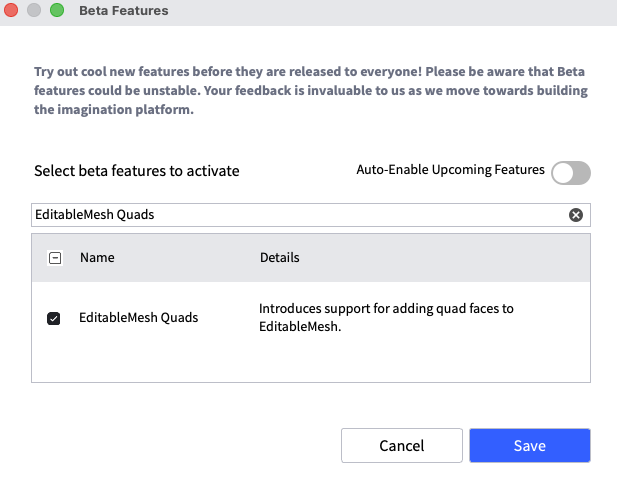
How to enable EditableMesh Quads in Roblox Studio
- Open Roblox Studio.
- Choose File, then open Beta Features.
- Find and enable EditableMesh Quads.
- Save the Beta Features settings.
- Restart Studio so the new behavior takes effect.
The option is a Studio Beta feature in Roblox's September 23 announcement. Beta tools can change as Roblox responds to creator feedback, so check the current Studio interface and official release notes before building a production workflow around it.

Important limitations to understand
Quads still count toward the triangle limit
Native quads do not double the amount of geometry the engine can handle. Roblox states that each quad counts as two triangles toward EditableMesh's existing 20,000-triangle limit. The current Creator Hub reference also lists a 60,000-vertex limit. Developers should budget geometry with those limits in mind.
Exporting or baking can convert quads back into triangles
Roblox says that converting an EditableMesh into a representation that does not support quads—for example, publishing it as a mesh asset or baking it with AssetService:CreateDataModelContentAsync()—triangulates quad faces. The original quad structure cannot be recovered simply by converting that result back into an EditableMesh.
Published-experience availability needs a separate check
The original announcement described quad creation as a Studio Beta and said Roblox planned to make the API changes available in published games after iterating on feedback. The current Creator Hub reference documents AddFace and quad faces, but that alone is not the same as a clear release announcement for every published-experience environment. Before shipping a live game feature, verify the current Studio Beta status and test the API in the exact environment you intend to use.
EditableMesh permissions still apply
EditableMesh has separate security and permission requirements. Roblox's documentation says creators must meet the account and experience requirements and enable the Mesh / Image APIs setting for published experiences. When loading an existing mesh, ownership or explicit sharing permissions also matter. Quad support does not remove those existing restrictions.
When should developers use quads instead of triangles?
Use quads when your tool or algorithm benefits from treating a four-sided region as one editable face—for example, a box-modeling editor, procedural surface builder, or topology-aware plugin. Continue using triangles when your pipeline specifically depends on triangular faces, when you need predictable triangle-level processing, or when a downstream format requires triangulated geometry.
For systems that must operate only on triangles, Roblox documents EditableMesh:Triangulate() as the method for splitting quad faces into triangles. That gives developers a clear conversion step when a later operation cannot work with quads.
What this update means for Roblox Studio development
The practical value of native quad support is not a promise of automatic performance gains or a larger mesh budget. It is a better editing abstraction. Developers can express a four-sided face directly, build cleaner topology tools, and let Roblox handle the internal triangulation needed for rendering and spatial queries.
That is a meaningful improvement for creators making procedural geometry and mesh-editing tools. The best approach is to test the Beta with small representative meshes, check how your scripts handle face IDs and attributes, watch the triangle budget, and explicitly triangulate before any downstream step that requires triangles.
Frequently asked questions
Does Roblox EditableMesh support quad faces?
Yes. Roblox's current EditableMesh API reference documents AddFace() for both triangle and quad faces. The feature was announced as a Studio Beta on September 23, 2026.
How do you create a quad in EditableMesh?
Create or obtain four vertex IDs, then pass them in order to EditableMesh:AddFace(v1, v2, v3, v4). The method returns the new face ID.
Can a mesh contain both triangles and quads?
Yes. Roblox says developers can mix triangle and quad faces in the same EditableMesh.
Do quads count as one face or two triangles toward the limit?
A quad is one logical face, but Roblox counts it as two triangles toward the 20,000-triangle limit.
Can I publish a quad-based EditableMesh as a mesh asset without conversion?
Roblox's announcement says formats that do not support quads triangulate them during conversion or baking. The original quad topology is not retained in that converted representation.
Where do I enable EditableMesh Quads?
In Roblox Studio, open File, choose Beta Features, enable EditableMesh Quads, save, and restart Studio.





