

Quick answer: Starting October 19, 2026, Roblox stopped giving Home-page recommendation impressions to experiences that use only a default thumbnail. Creators need at least one custom thumbnail that accurately shows their gameplay. This is an eligibility rule for Home recommendations—not a promise that a game will rank, trend, or receive a specific number of visits.

Roblox has introduced a practical change that can affect how players discover games: a default placeholder image is no longer enough to qualify an experience for impressions in the Home recommendation system. The change was announced on the Roblox Developer Forum on October 19, 2026, and the announcement says it took effect immediately.
What changed on October 19?
Roblox says that only experiences with at least one custom thumbnail can receive impressions from Home recommendations. If a game still uses only the default thumbnail, it is not eligible for those recommendation impressions. Roblox explains that a custom image gives players a clearer idea of what they will experience before they click.
The distinction matters: the update is about eligibility, not guaranteed placement. Uploading a custom thumbnail removes this particular barrier, but it does not guarantee that Roblox will recommend the game or send it more traffic. Roblox's discovery guidance says recommendations also depend on player behavior, including play-through rate, early exits, playtime, return visits, and social play.
Does every Roblox game need a new image?
No. The official announcement focuses on experiences that have only a default thumbnail. If an experience already has at least one custom thumbnail, the announcement does not ask its creator to replace it simply because the rule changed. The important check is whether the game has a genuine uploaded custom image rather than relying only on a default placeholder.
Roblox's FAQ is explicit that the default thumbnail does not count as custom. The announcement recommends uploading at least one image that accurately represents the experience. Creators can upload up to five thumbnails to show different parts of the gameplay.
How to add a custom thumbnail in Roblox
- Open the Roblox Creator Dashboard and select the experience you want to update.
- Go to Configure, open Places, and select the relevant place.
- Choose Thumbnails from the left navigation.
- Use the Home Page tab and the Experience Detail Page tab to manage the images for those surfaces.
- Upload at least one custom image that accurately reflects the actual game, then save your changes.
What size should a custom thumbnail be?
Roblox recommends a 16:9 aspect ratio, ideally 1920 × 1080 pixels, so the image stays sharp across the website and app. Supported image formats listed in Creator Hub include JPG, GIF, PNG, TGA, and BMP. The platform may stretch images to a 16:9 display area, so starting with the correct ratio helps avoid unwanted cropping or distortion.
Keep the main subject clear and make sure the image matches what players will actually see in the experience. Avoid misleading artwork, unrelated characters, or visual claims that the game does not deliver. Roblox's discovery guidance also encourages unique, accurate metadata rather than repetitive or mismatched images.

Can creators use more than one thumbnail?
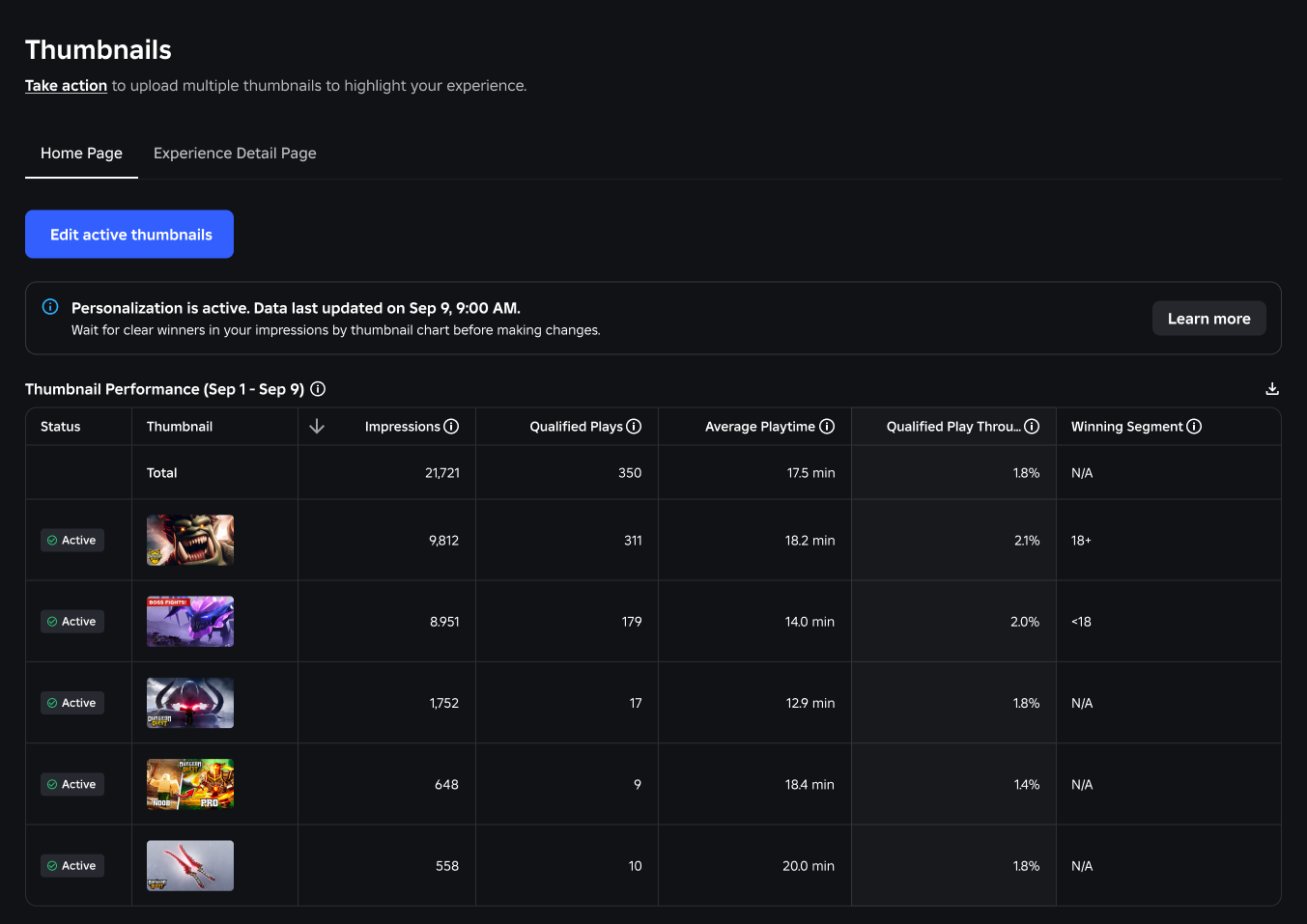
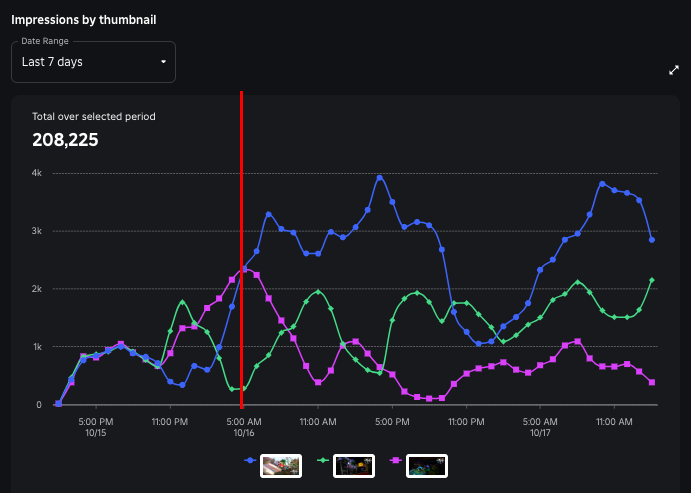
Yes. Roblox documentation says creators can activate multiple thumbnails for Home-page personalization. Personalization begins when two or more thumbnails are active; with only one active image, everyone sees that image. The Home Page tab can have between two and five active thumbnails for this test. Roblox then evaluates how different audience groups respond and can give more impressions to stronger-performing versions.
That makes multiple thumbnails useful for testing different authentic views of the same experience—for example, a main gameplay scene, a new feature, or a distinct game mode. Do not use several near-identical images just to fill every slot. Each version should help players understand a real part of the game.

Will a game disappear from Roblox if it has no custom thumbnail?
No. The announcement says that an experience with only a default thumbnail will not receive impressions from Home recommendations. It also specifically answers that a game can still appear in the Continue sort for a player who has already played it. The change should not be described as a game removal or a platform-wide ban.
What the update means for players
Players may notice more descriptive images in recommendation rows as creators update their listings. A custom thumbnail gives a better preview, but it is not proof that a game is high quality or safe by itself. Players should still check the game description, age guidance, ratings, and details before joining.
What creators should check now
- Review every experience that still uses a default placeholder image.
- Upload at least one custom thumbnail that accurately reflects real gameplay.
- Use a clear 16:9 image, ideally 1920 × 1080 pixels.
- Check the Home Page and Experience Detail Page thumbnail settings separately.
- Consider testing two to five genuinely different images if thumbnail personalization is useful for the game.
- Monitor Home Recommendations analytics after the changes, while remembering that eligibility does not guarantee impressions.
Official sources and further reading
- Roblox Developer Forum: Homepage Recommendation Eligibility Now Requires a Custom Thumbnail (October 19, 2026)
- Roblox Creator Hub: Discovery and Home recommendations
- Roblox Creator Hub: Experience thumbnails and personalization
Frequently asked questions
When did Roblox start requiring custom thumbnails for Home recommendations?
The rule was announced and took effect on October 19, 2026, according to the Roblox Developer Forum post.
How many custom thumbnails are required?
At least one custom thumbnail is required for eligibility. Roblox says creators can upload up to five to showcase different gameplay elements.
Does the default Roblox thumbnail count?
No. Roblox's announcement says a default thumbnail does not count as a custom thumbnail.
Will uploading a custom thumbnail guarantee more players?
No. It makes the experience eligible for Home recommendation impressions under this rule, but recommendation distribution still depends on Roblox's discovery systems and player engagement.
Can players still find a game that has only a default thumbnail?
Yes. Roblox says a game can still appear in a player's Continue sort if that player has already played it, even when the game has only a default thumbnail.
By Shivam Das





