

Quick answer
A Roblox Charts language bug report says player-count abbreviations can follow the website's selected language instead of the language saved in a player's account. In the example reported on October 29, 2026, an English-account user browsing the Turkish-language website saw “K” on Home but “B” on Charts. In Turkish, “bin” means thousand. The report describes a display-formatting mismatch; it does not establish that Roblox's underlying player totals are wrong or that a fix has been announced.
What the Roblox Charts language bug actually changes
The issue was posted in Roblox's Application and Website Bugs category on October 29, 2026. The reporter said their account language was English while the website language was Turkish. On the Home page, a game’s player count used the English-style “K” abbreviation. On the Charts page, the same type of count appeared with “B,” which the reporter identified as the Turkish abbreviation for thousand (“bin”).
That distinction matters. A localized suffix can look like a different magnitude to someone who reads it using another language’s conventions. In this reported example, “B” should not automatically be interpreted as “billion.” The report is about how a number is abbreviated on screen, not proof that a game's live concurrent-player total has multiplied or collapsed.

Why the same account can show different abbreviations
Roblox has separate language controls in different parts of the product. Its support instructions explain that players can change the language saved to their account through Settings, Account Info, and the Personal section. The website also exposes a language selector, so a player's account language and the language used to browse the site are not necessarily identical.
The October 29 report suggests that the Home page and Charts page may be reading different language preferences when formatting abbreviated counts. The expected behavior described by the reporter is consistency: Charts should use the account-language convention, matching the Home page. Roblox has not publicly confirmed in the cited report that this is the root cause across every language combination.
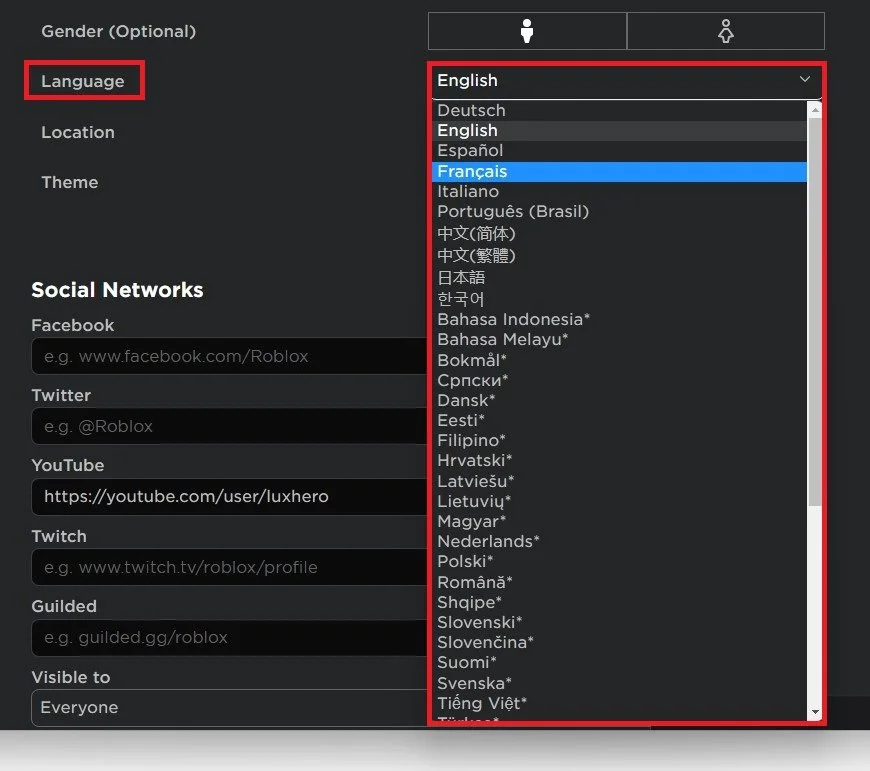
How to check whether your player count is only being formatted differently
- Open Roblox and note the language saved under Settings → Account Info → Personal.
- Check the website language selector, usually available near the bottom of the Roblox website.
- Open the Home page and note the abbreviated player count for one experience.
- Open Charts and compare the same experience, using the same device and location filters where possible.
- If the suffix changes while the game and filters remain the same, record both language settings and take screenshots before reporting the issue.
Do not compare two different games, different chart filters, or screenshots captured at widely separated times and assume the suffix is the only variable. Roblox player counts change continuously, and Charts can also be filtered by device or location.

Is Roblox fixing the Charts language bug?
As of November 4, 2026, the public evidence located for this story is a community bug report, not an official Roblox fix announcement. The report had two replies and was still visible in the Developer Forum's bug-report listings on November 4. That activity shows the report remains discoverable; it does not confirm that Roblox has accepted the issue, assigned a release date, or deployed a correction.
Players should therefore treat “fix incoming” as unconfirmed. If Roblox posts an official response or the Charts display changes in a later update, the status can be revised with a dated source. Until then, matching the website and account languages can be a practical temporary check, but it is not a verified permanent fix.

What players should do now
If the mismatch affects how you read a game’s popularity, temporarily set the website language to match your account language, refresh both pages, and compare the same experience again. This is a troubleshooting check, not a Roblox-confirmed workaround. If the mismatch remains, submit a report through Roblox's official support or bug-report channels and include the account language, website language, browser, device, chart filters, and screenshots from both pages.
For a fair comparison, remember that a count suffix is a compact display convention. Check the underlying digits and the language used for the suffix before concluding that a game has a different number of active players. A “B” shown in a Turkish-language context can mean “bin” (thousand), rather than the English word “billion.”
Frequently Asked Questions
Why does Roblox Charts show “B” instead of “K”?
The October 29, 2026 report says the Charts page may use the website language rather than the account language for player-count abbreviations. In Turkish, “B” can represent “bin,” meaning thousand. It does not necessarily mean billion.
Does this bug change the actual number of players?
The report describes a formatting inconsistency. It does not provide evidence that Roblox's underlying player-count data is changed. Compare the same experience and filters before drawing conclusions.
Is Roblox's Charts language bug fixed?
No official fix or release date was confirmed in the public sources reviewed for this article as of November 4, 2026. The forum report is not the same as an official fix announcement.
How do I change my Roblox account language?
Roblox Support says to sign in, open Settings, choose Account Info, and change the language under the Personal section. Save the setting if the page does not reload automatically.
Should I change my account language to fix the Charts display?
You do not need to permanently change your account language. Matching the website language to your account language can help test whether the mismatch is related to localization, but it is only a temporary diagnostic step, not a confirmed permanent fix.
Sources and further reading
- Original Roblox Developer Forum bug report (October 29, 2026)
- Roblox Support: Changing Your Account Language
- Roblox Support: Automatic Translations and supported languages
- Roblox Charts
Reporting note: This article distinguishes the community-reported behavior from confirmed Roblox announcements. It will be updated if Roblox publishes a verified fix or additional technical explanation.





